English
 中文
中文 Pусский
 Español
Improving Cutting Accuracy on a Paper Sheeter: Operator Tips and Adjustments
You’re running a job on your paper sheeter, and the cut lengths are drifting. ±0.5mm is the line between good product and waste. You can call an engineer—or you can fix it yourself.
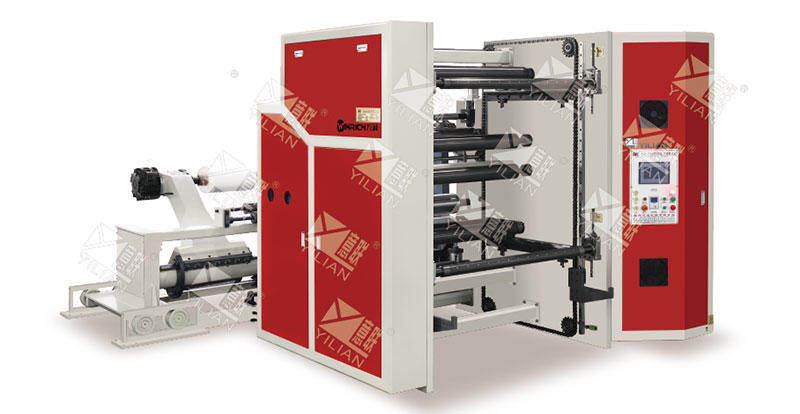
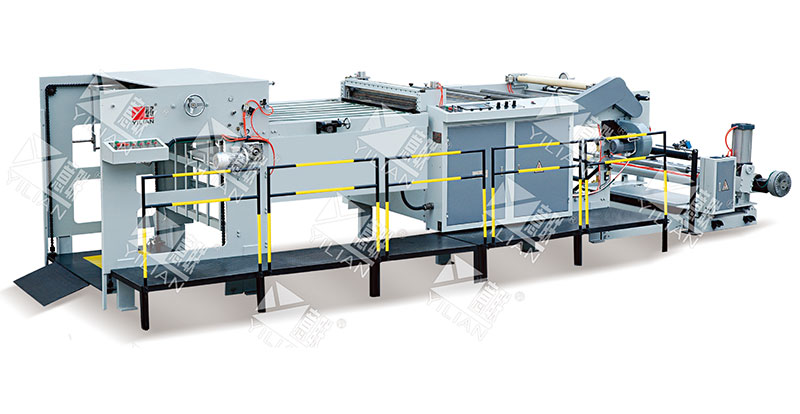
Most accuracy problems on a Paper Cutting Machine don‘t require a service call. They come from five common factors: web tension, knife condition, feed-cutter synchronization, material variations, and squareness. The DFJ 1100-1700 High Speed Computer Automatic Finishing Cutting Machine from Yilian Machinery is designed with advanced servo motor technology for consistent cutting speeds and precision bearings for smooth, accurate cuts. But even the best machine needs the right operator adjustments to deliver its full accuracy potential.
This article walks you through each factor in order—from the most likely culprit to the least. You’ll learn how to spot the problem, what to adjust, and how to build a daily verification routine that catches drift before it becomes scrap. For sheeter operators and finishing supervisors, this is practical knowledge you can use on your next shift.
Tension First
Fluctuating web tension is the number one cause of cut length variation. It’s also the easiest to fix.
How Tension Affects Cut Length
When tension fluctuates, the paper stretches or relaxes before it reaches the cutter. Higher tension stretches the web, making the cut length longer than the set value. Lower tension allows the web to relax, shortening the cut. Even small tension changes—a few percent—can shift cut length by 0.5mm or more.
Watch the Tension Display
Most modern sheeters have a tension display on the control panel. If you don‘t have one, use a simple marker test: put a mark on the web at a fixed point, run 10 meters, and measure the actual length against the set length. If they don’t match, tension is your first suspect.
What to Adjust
If tension is fluctuating, check the unwind brake pressure and the feed roll nip pressure. Both should be steady. The DFJ series features automatic feeding and photoelectric tracking to maximize output—but even automated systems need periodic verification.
Knives Matter
Dull knives don‘t cut cleanly—they tear. And tearing creates dust, burrs, and accuracy drift.
Signs of a Dull Knife
Look for burrs on the cut edge, fiber tearing instead of clean slicing, and excessive paper dust on the machine. If you see any of these, the knife needs attention. A dull knife also increases cutting force, which can shift the web during the cut.
How Often to Sharpen
Sharpening frequency depends on meterage, not calendar days. A knife that runs 100,000 cuts on lightweight paper may need sharpening less often than one that runs 50,000 cuts on heavy board. Track meterage and sharpen when you see the first signs of dulling—don‘t wait until the cuts are visibly bad.
The Right Blade for the Job
The DFJ series is equipped with high-speed steel blades that ensure stable and abrasion-resistant cutting that’s easy to maintain and replace. Using the correct blade for your material makes a measurable difference in cut quality and blade life.
Sync It Right
The feed rolls and the rotary cutter need to work together. If they‘re out of sync, your cuts won’t be square.
What Synchronization Means
The feed rolls push the web forward at a set speed. The rotary cutter cuts at a set interval. If the two aren‘t precisely synchronized, the cut happens at the wrong point in the web’s travel. The result is a cut that‘s either too long or too short—and a squareness error that shows up as a diagonal cut instead of a straight one.
How to Check
Run a short test cut and measure the length at both edges of the web. If the left edge is longer than the right edge, the synchronization is off. The DFJ series uses servo motor control for long cuts, providing consistent cutting speeds. But even servo-driven systems can drift if the encoder or feedback loop isn’t calibrated.
The Fix
Adjust the phase offset on the control interface. Make small changes—0.1° at a time—and retest. The DFJ‘s intuitive touch-type interface simplifies parameter adjustments, making this fine-tuning accessible to operators.
Adjust for What You Cut
Paper isn’t consistent. It changes with the seasons, the supplier, and the storage conditions.
Moisture Content Changes Everything
Paper absorbs moisture from the air. In humid weather, the paper swells and becomes more elastic. In dry weather, it shrinks and stiffens. These changes affect how the paper behaves under tension and how it cuts. A setting that worked perfectly in winter may drift in summer.
Seasonal Adjustments
In humid conditions, reduce the cutting speed slightly. Slower speed gives the paper more time to stabilize under tension, reducing cut length variation. In dry conditions, you may need to increase tension slightly to compensate for the stiffer paper.
Batch-to-Batch Variation
Different batches of the same paper grade can behave differently. Always run a test cut when you start a new roll or a new batch. Adjust tension and speed as needed, and document the settings for each material type.
Square It Up
If your cuts are accurate in length but not square—one edge longer than the other—the problem is alignment.
What Squareness Means
A square cut has all four corners at 90°. If the cut is out of square, the finished sheet is a parallelogram instead of a rectangle. This is usually caused by the conveyor belt or the cutter axis being misaligned relative to the web path.
The String Test
Run a string from one side of the conveyor to the other, parallel to the cutter axis. Measure the distance from the string to the conveyor edge at both ends. If the distances differ, the conveyor isn‘t square to the cutter. Adjust the conveyor alignment until the distances match.
The Diagonal Test
Cut a sample sheet and measure the two diagonals. If they’re different lengths, the sheet isn‘t square. Adjust the conveyor alignment or the cutter angle until the diagonals match. This is a simple test that takes 30 seconds and catches alignment issues early.
Check It Every Shift
The best way to catch accuracy drift is to check it every shift. A few minutes of testing saves hours of rework.
Cut the First Sheet
At the start of each shift, cut a sample sheet and measure its length and diagonals. Record the measurements in a log. If the numbers match the target, you’re good to go. If they don‘t, make the necessary adjustments before running the full job.Track the Trend
Don’t just check once—check consistently. Over time, the log will show you trends. If the cut length is gradually increasing, you know the tension is drifting or the knives are dulling. You can intervene before the drift becomes a problem. Yilian Machinery‘s machines are designed for reliability and stability during high-speed production, but consistent operator checks are what keep them running at peak accuracy.
Three Key Indicators
Track these three numbers every shift: cut length (at both edges), diagonal difference, and knife condition (visual check). If any of the three is out of spec, investigate and fix it before running production. The DFJ series is designed for versatile applications, including paper, trademarks, labels, and composites, and each material may require slightly different attention to these indicators.
Questions Operators Ask
Why does cut length drift after 2 hours of running?
This is almost always thermal expansion. The machine warms up as it runs, and the feed rolls, conveyor, and cutter all expand slightly. The expansion changes the effective length of the web path. The fix is to let the machine warm up for 30 minutes before making final adjustments, and to set your cut length after the machine is at operating temperature. The DFJ series uses servo motor technology for consistent cutting speeds, which helps minimize thermal drift, but some adjustment is still normal.
Can I achieve ±0.3mm on thin paper (40 gsm)?
Yes, but it requires careful attention to tension and knife condition. Thin paper is more sensitive to tension fluctuations and more easily damaged by dull knives. Use the lowest possible tension that still maintains web stability, keep knives sharp, and check cut length more frequently—every 500 sheets instead of every 1,000. The DFJ series’ precision bearings ensure smooth, accurate cuts, providing the mechanical foundation for tight tolerances.
How to store spare knives to avoid edge damage?
Store knives vertically, not flat. Flat storage can cause the edge to contact the storage surface, creating micro-nicks. Use a dedicated knife rack with individual slots, and keep the knives clean and lightly oiled to prevent rust. The DFJ series’ high-speed steel blades are abrasion-resistant, but even the best blades need proper storage to maintain their edge.
Check It Every Shift
The best way to catch accuracy drift is to check it every shift. A few minutes of testing saves hours of rework.
Cut the First Sheet
At the start of each shift, cut a sample sheet and measure its length and diagonals. Record the measurements in a log. If the numbers match the target, you‘re good to go. If they don’t, make the necessary adjustments before running the full job.
Track the Trend
Don‘t just check once—check consistently. Over time, the log will show you trends. If the cut length is gradually increasing, you know the tension is drifting or the knives are dulling. You can intervene before the drift becomes a problem. Yilian Machinery’s machines are designed for reliability and stability during high-speed production, but consistent operator checks are what keep them running at peak accuracy.
Three Key Indicators
Track these three numbers every shift: cut length (at both edges), diagonal difference, and knife condition (visual check). If any of the three is out of spec, investigate and fix it before running production. The DFJ series is designed for versatile applications, including paper, trademarks, labels, and composites, and each material may require slightly different attention to these indicators.
Yilian Machinery manufactures paper cutting machines designed for precision and productivity. The DFJ 1100-1700 High Speed Computer Automatic Finishing Cutting Machine features servo motor control for consistent cutting speeds, precision bearings for smooth and accurate cuts, and an intuitive touch-type interface for easy parameter adjustments. The machine includes automatic feeding and photoelectric tracking to maximize output, and is suitable for a wide range of materials including paper, trademarks, labels, and composites.
Cutting accuracy on a paper sheeter isn‘t magic—it’s a systematic process of checking the five key factors: web tension, knife condition, feed-cutter synchronization, material variations, and squareness. Start with tension, since it‘s the most common culprit. Move through the list in order, and build a daily verification routine that catches drift before it becomes waste. With the right adjustments and a consistent routine, ±0.5mm is achievable shift after shift.
Ready to improve your sheeter‘s cutting accuracy? Reach out to Yilian Machinery’s technical team—they can provide blade sharpening recommendations, tension calibration guidance, and machine-specific adjustment tips for your DFJ series paper cutting machine.